🎉 Free 14-day trial on every plan — no credit card, no sales call, cancel anytime. Start now →
🏪 POS billing software

Billing software for your shop counter

PeppyBooks POS is the software your staff use to bill customers at the counter. Scan the item, take the money, print the receipt — and your stock and your accounts update themselves. From $17 per user per month.

  • No credit card required
  • Set up in under 10 minutes
  • Cancel anytime, keep your data
PeppyBooks POS · Counter 2
Rice 5kg × 2$18.40
Cooking oil 1L × 3$12.90
VAT · added ✓$4.70
Total$36.00
Card $20.00Cash $16.00
Receipt printed · stock & accounts updated
Start here

What is POS billing software?

POS stands for point of sale — the counter where you bill your customer. POS billing software is simply the program your staff use to make that bill: scan the item, it picks up the price and tax, take cash or card, print the receipt.

The difference with PeppyBooks is what happens after the bill. In most shops the billing machine is one thing and the accounts are another, so somebody adds it all up again at night or hands a pile of bills to an accountant. With PeppyBooks, the bill IS the accounting entry. Your stock drops, your tax is recorded, and your day's sales reach your books — with nobody typing it twice.

How it helps you

How it helps your kind of business

The same software, doing a different job depending on what you sell.

Retail outlets

Today: Queues build up at busy hours, and at night someone adds up the day by hand.

With PeppyBooks: Scan and bill in seconds. The day's sales, tax and profit are ready before you lock up — no adding up.

Supermarkets

Today: Thousands of items, several counters, and stock that nobody can count.

With PeppyBooks: Every counter shares one live stock list. Weighed items, offers and multiple tills all bill correctly.

Traders & wholesalers

Today: Different customers pay different rates, and staff have to remember who gets what.

With PeppyBooks: Each customer's own price applies by itself, and credit limits are checked before the goods go out.

Pharmacies

Today: An expired batch reaching the counter is a serious problem, and expiry money is lost.

With PeppyBooks: Batch and expiry are tracked. The oldest batch bills first, expired stock is blocked, and returns are claimed in time.

Electronics shops

Today: "Which piece did this customer buy?" turns every warranty claim into an argument.

With PeppyBooks: The serial number is recorded against the bill. Search it once and the whole history is on screen.

Restaurants

Today: Orders get lost between the table and the kitchen, and nobody knows what a dish costs.

With PeppyBooks: The order reaches the kitchen instantly, and each dish is costed from its recipe as material rates change.

The problems this solves

What goes wrong at the counter today — and what changes

Your staff stop billing the moment the internet drops
Billing carries on, and everything sends itself once you are back online
Somebody adds up the day by hand every night
The day's total is on screen the moment the last customer leaves
Your bill book and your books never quite agree
There is only one record — the bill IS the accounting entry
You find out an item ran out when a customer asks for it
Stock goes down as you sell, and you're told before it runs out
How it works

Up and running in three calm steps

1

Scan and bill

Barcode-fast counter sales — online or offline.

2

The tax part is handled

Where your country requires it, the receipt is sent to the tax department as it prints.

3

The day posts itself

Stock, taxes and takings land in the books at close.

01

Simple enough for a busy counter

At a busy hour your staff have no time to think about software. Scan, take the money, print, next customer. That is the whole job.

Scan the barcode, or search the item by name

Keep a bill aside and come back to it when a customer forgets something

Take part cash and part card on the same bill

Count the drawer at the end of each shift, on screen

02

Keeps billing when the internet goes

An internet problem should not stop your shop. Billing carries on as normal, and everything catches up by itself once you are back online — including anything the tax department needs.

Bills carry on when the connection drops

Everything sends itself once you are back online

Runs on an ordinary Android tablet

As many counters as your shop needs

03

Your stock and your profit, without counting

Every sale takes the item off your stock straight away. And because PeppyBooks knows what you actually paid for the goods — including freight and duty — the profit it shows you is the real one, not a guess.

Stock goes down as you sell

Told when an item is running low

Profit by item, by category and by shop

Move stock to your other shop and see it both sides

04

Receipts the tax office accepts, books that fill themselves

Where your country requires it, the receipt is sent to the tax department as you print it — no separate machine, no typing into a portal. And each day's sales reach your accounts on their own.

Receipts carry whatever your country requires, automatically

The day's takings reach your accounts with nothing to send

Correct tax on every line

Returns and exchanges keep a proper record

Inside the product

What your staff will see on the screen

Three real screens from PeppyBooks — and what each one is for.

erp.peppybooks.com/pos
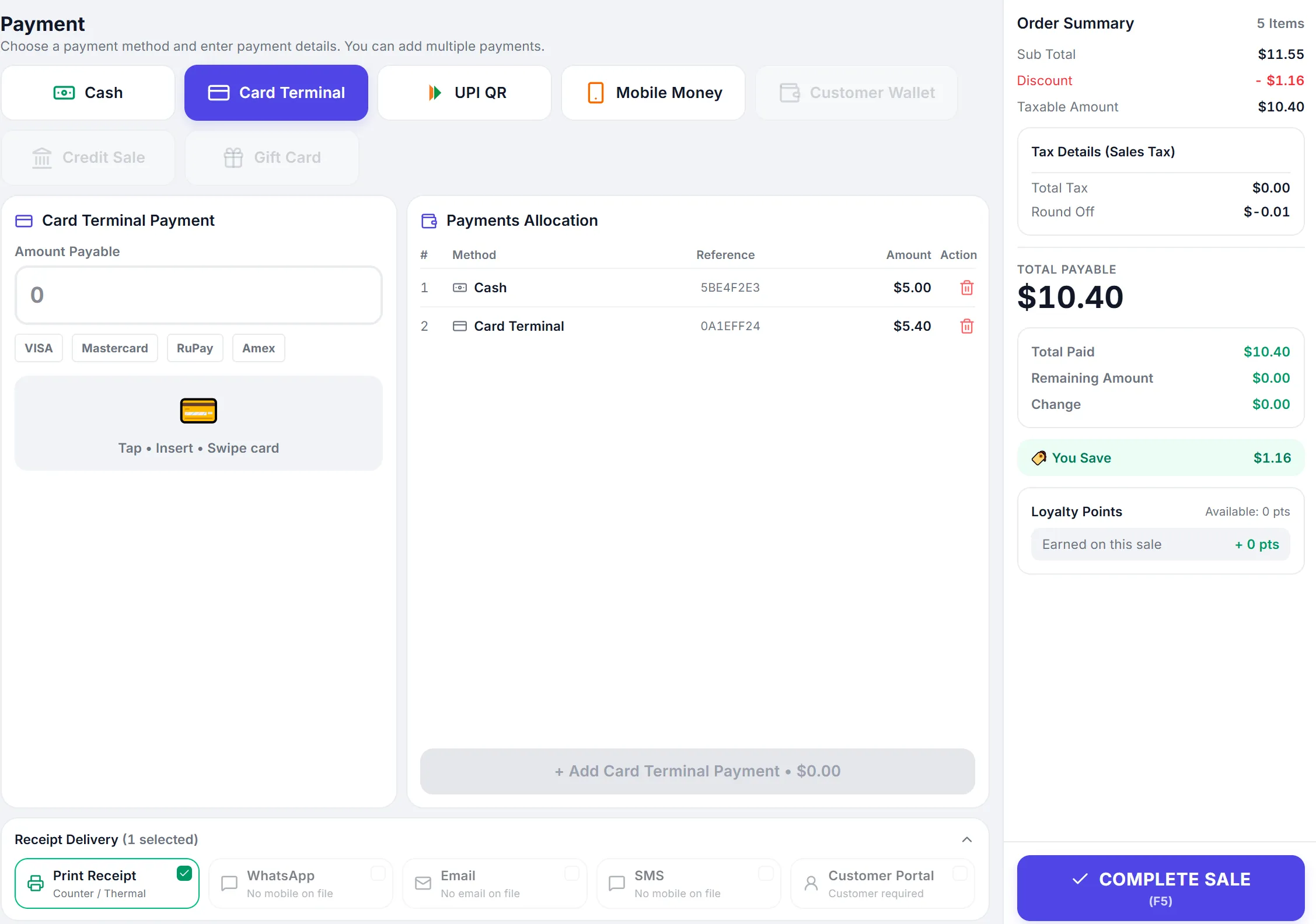
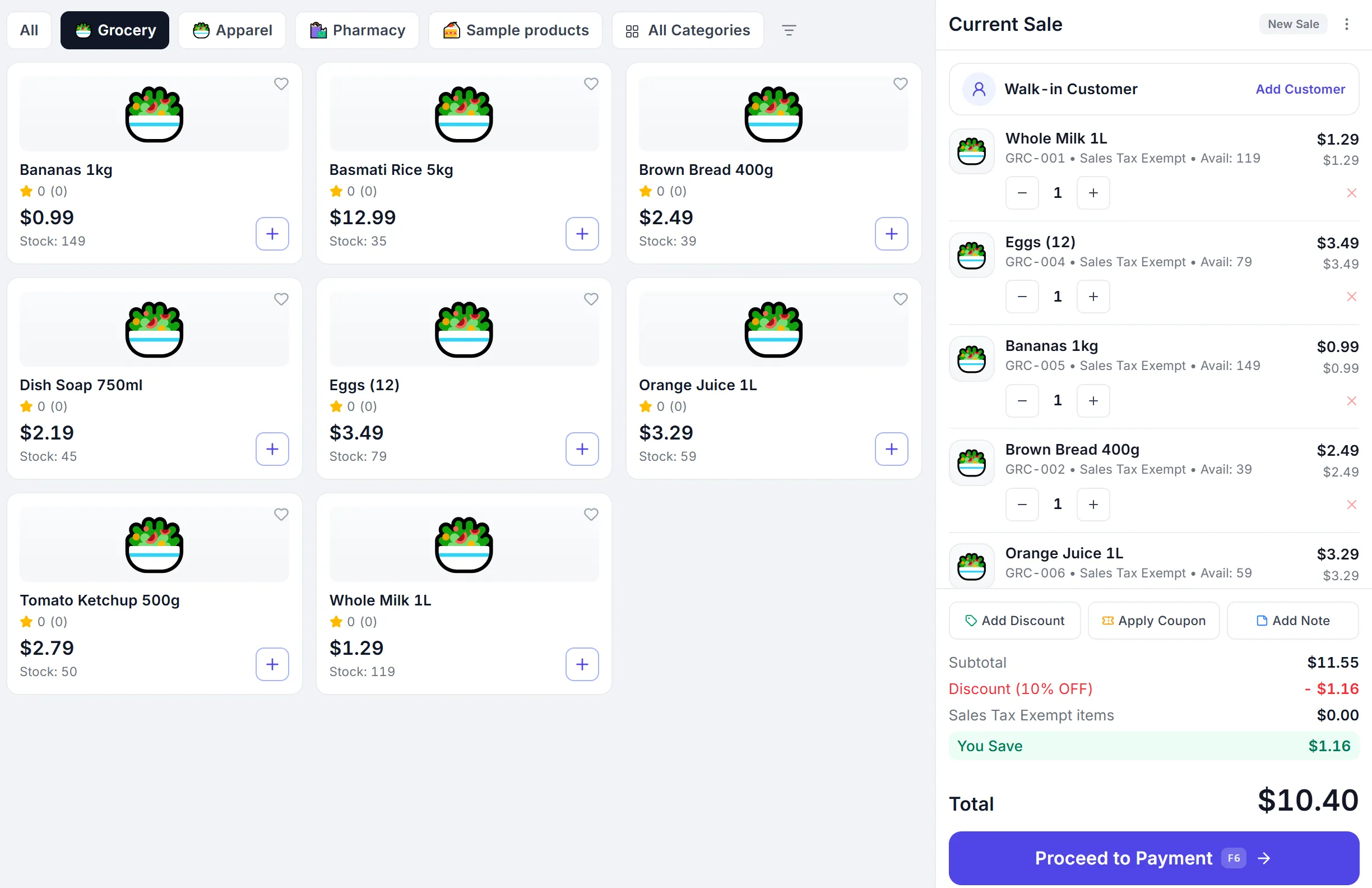
PeppyBooks POS terminal — barcode scan and product search, category tabs, and a live cart with subtotal, discount, VAT and Pay & Print.

This is the counter screen your staff use all day. They scan an item or tap it from the tiles — the price and tax come in by themselves. The right side adds up as they go, so the customer is told the correct total. One button takes the money and prints the receipt.

Notice Look at the right-hand column: discount and VAT are worked out as each item goes in. Nobody is doing this on a calculator.

erp.peppybooks.com/pos/day-summary
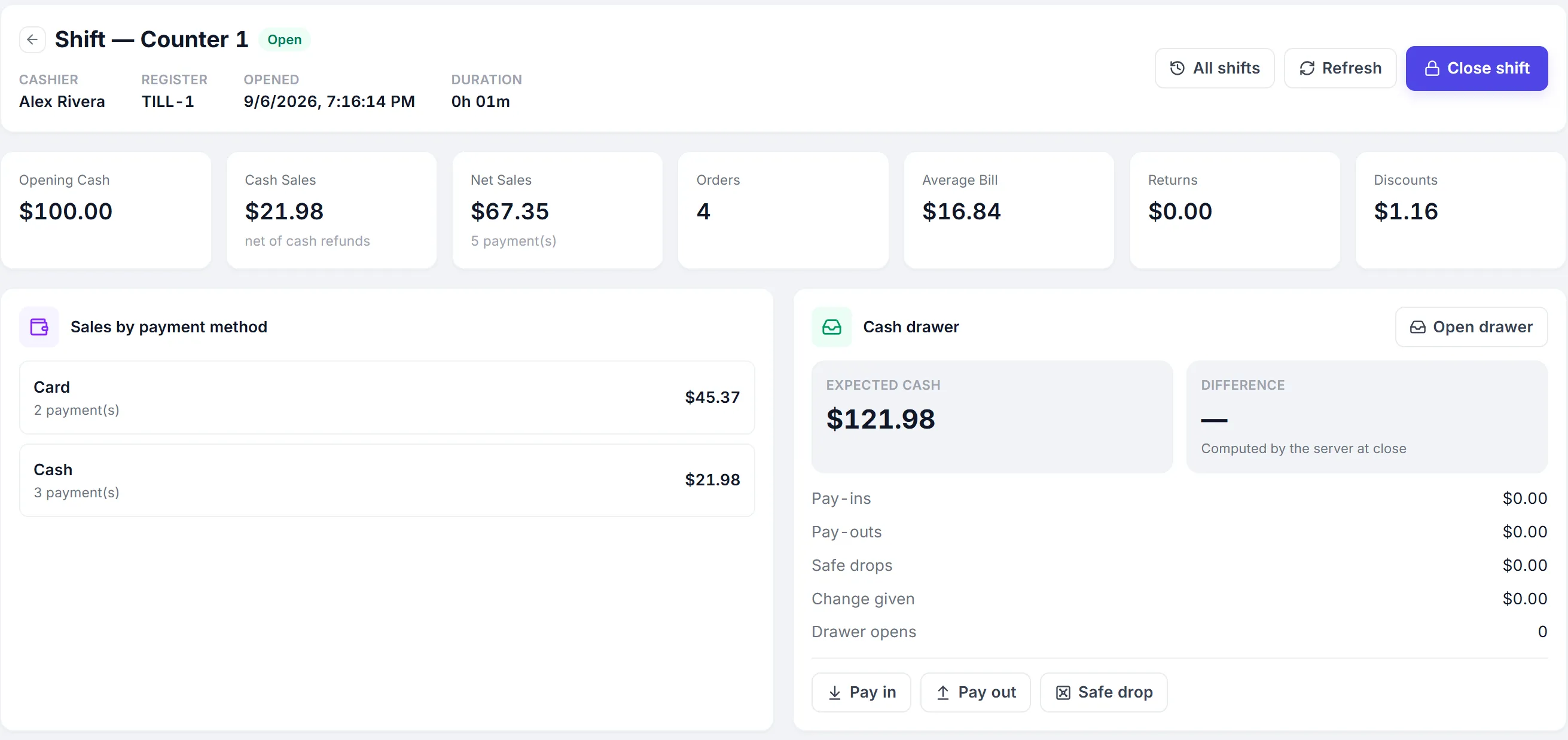
PeppyBooks POS Day Summary — total sales, bill count and receipts, broken down by payment method and bill type.

This is what you check before you lock up. The day's total sales, how many bills, and how much came in by cash, card and mobile money — so the money in the drawer can be checked against the screen in a minute.

Notice This is the screen that replaces adding up the day by hand. It is ready the moment the last customer leaves.

erp.peppybooks.com/pos/bills
PeppyBooks POS All Bills — every sales transaction with bill number, type, customer and payment mode (Airtel Money, MTN MoMo, Cash, Card).

Every bill your shop has made, in one list. Search any bill by number or customer when someone comes back to return something or asks for a copy. Each line shows how the customer paid — cash, card or mobile money.

Notice Because this list is the same record as your accounts, you never have to match your bill book against your books at month-end.

90-second product tour

Your first minute and a half

  1. 0:00Scan three items — the bill builds itself with taxes correct.
  2. 0:15Customer pays half card, half cash; the split just works.
  3. 0:30Receipt prints with the fiscal QR code.
  4. 0:45Internet drops — billing continues offline, badge shows 'will sync'.
  5. 1:00Close the shift: cash-up report posts straight to the books.

Do this on your own data — free

What you get

A counter that runs itself

Your evenings back

No adding up the day, no pile of bills for the accountant. It's done when the shop closes.

Money you were losing, visible

Real profit per item — so you can see what earns and what just fills the shelf.

One bill, not three jobs

Billing, stock and accounts stop being separate work done by separate people.

Included in plans from $17/user/month — every plan starts with a full-featured trial. See pricing Start for free
Compare

PeppyBooks compared with the software shops usually consider

An honest look. Each of these is good at what it was built for — the question is whether billing and your accounts end up as one thing or two.

PeppyBooks POS compared with the options most shops weigh up
What mattersPeppyBooksTallyZoho BooksQuickBooksA billing machine
Counter billing built inYesYes — POS invoicing is includedDepends on plan; POS may require another applicationDepends on plan; POS may require another applicationYes — this is what it does
Keeps billing with no internetYes — sends everything laterYes — a genuine strength, it runs on your own computerBest suited for working onlineBest suited for working onlineYes — usually offline by design
Accounts update from the billYes — the bill is the entryYes — a genuine strength, accounting is its coreYes — accounting is its coreYes — accounting is its coreNo — added up separately
Stock, customers, purchases & staff pay togetherIncluded by planStock included; CRM and payroll may require another applicationMay require other Zoho applicationsMay require another applicationNot its purpose
Use it from anywhere, on a phoneYes — built for the webBest suited for a computer in the shop; remote access is availableYes — built for the webYes — built for the webNo — tied to the counter
Several shops on one loginYes, on every planDepends on how your companies are set upDepends on planOften a subscription per companyEach machine is its own island
Country e-invoicing (India, Kenya, Zambia, Ghana, UAE & more)9 countries built inStrong in India (GST & e-invoicing)Depends on the country editionNot available in India since 2023Depends on the machine
How it's pricedFrom $17 per user per monthMainly a one-time licence, plus yearly supportMonthly subscription, by planMonthly subscription, by planOne-off cost, plus someone to add up the day

Where each is strong: Tally is a genuine strength if you want your books on your own computer and your accountant already knows it. Zoho Books and QuickBooks are strong cloud accounting products, especially for service businesses. A billing machine is fine if you only need to print bills. PeppyBooks is best suited for shops that want the bill, the stock and the accounts to be one thing, across more than one location. Compiled from each vendor's published information — last verified 11 July 2026. Features and pricing change and vary by country and plan; please check the vendor's current terms before deciding.

Switching

Moving from what you use now

Most shops we talk to are on a billing machine, a notebook, or Tally with a separate bill book. You don't have to stop selling to change.

  1. 1
    Keep billing as you are

    Nothing switches off. Set PeppyBooks up on one counter while the shop runs as normal.

  2. 2
    Bring your items across

    Send us your item list in a spreadsheet — name, rate, tax, barcode. We load it for you.

  3. 3
    Try one counter for a day

    Bill a real day on one till. Compare the day summary with your own count.

  4. 4
    Move the rest when you're ready

    Only when that day matches do you move the other counters.

“What about my old data?”

Your item list, customers and opening stock come across. Old bills stay where they are — you keep them for your records; you don't need them to start.

“Can my staff learn it?”

The counter screen is one page: scan, take money, print. Staff who use a phone can use it. Train them on a quiet afternoon, not a Saturday.

“Do I have to buy new machines?”

Usually not. It runs on an ordinary Android tablet or computer and works with most receipt printers and barcode scanners you already own.

“What if I don't like it?”

The trial is 14 days and takes no card. If you stop, your data is still yours and you can export it.

Works with what you already have

Native to the PeppyBooks platform, open where it counts.

Reports that come standard

  • Daily sales & cash-up per counter
  • Sales by product, category & store
  • Margin by store
  • Tax collected summary
  • Returns & voids log
The complete guide

Billing software for your shop counter: what you need to know

Last updated 3 July 2026 · Reviewed by the PeppyBooks product & compliance team

What is POS billing software?

Point-of-sale (POS) software is what your staff use at the counter: scanning items, taking payment, printing the receipt and taking the item off your stock — fast enough for a queue. It used to mean an expensive till machine; today it is software that runs on an ordinary tablet or computer. In many countries the receipt must also be sent to the tax department as it is printed. The best systems also put the day's sales straight into your accounts, so what happened in the shop and what your books say are never two different stories.

Choosing retail POS: a checklist

  • Speed at the counter: scan, quick keys, hold a bill, take part cash and part card
  • Offline mode — outages must not stop sales
  • Stock that goes down as you sell, and warns you before an item runs out
  • Your country's tax rules built in, so receipts are accepted (India GST, Kenya eTIMS, Zambia ZRA, Ghana e-VAT and more)
  • More than one shop, with stock you can move between them
  • The day's takings reaching your accounts on their own
1platform for books, stock & CRM
2 clicksfrom report to source document
14 daysfree on every plan
FAQ

Common questions

Does the billing work if my internet goes down?

Yes. Your staff keep billing exactly as normal — the screen tells them it will send later. When the connection comes back, everything goes across by itself, including anything the tax department needs. You do nothing.

What machines do I need to buy?

Usually nothing new. PeppyBooks POS runs on an ordinary Android tablet, phone or computer, and works with most receipt printers and barcode scanners shops already own. Show us what you have and we'll tell you before you spend anything.

Do I still need an accountant?

Most businesses keep their accountant — but they stop paying them to type. Because every bill is already an accounting entry, your accountant reviews and files instead of re-entering your bill book. You can give them their own login.

Can my staff actually learn this?

The counter screen is one page: scan, take money, print. Staff who can use a phone can use it. Train on a quiet afternoon and bill a real day on one counter before you move the rest.

Can I use it in more than one shop?

Yes, on every plan. Each shop bills on its own, you see them separately or together from one login, and you can move stock between them.

What happens to my old bills and data?

Your item list, customers and opening stock come across. Old bills stay where they are for your records — you don't need them to start billing. Whatever you put into PeppyBooks stays yours and can be exported at any time.

Can I use my existing barcode scanner and printer?

In most cases yes — PeppyBooks POS works with standard USB/Bluetooth scanners and common receipt printers on Android devices.

Start for free — 14 days, no card