🎉 Free 14-day trial on every plan — no credit card, no sales call, cancel anytime. Start now →
💳 Billing & invoicing

Software to make your invoices

Make an invoice in seconds, send it by email or WhatsApp, and see who has paid and who has not — without keeping a separate bill book, a spreadsheet and an accountant's file. From $17 per user per month.

  • No credit card required
  • Set up in under 10 minutes
  • Cancel anytime, keep your data
Receivables · Live
INV-1042 · Acme RetailPaid ✓
INV-1043 · Brightside CoDue in 4 days
INV-1039 · reminder sentOverdue 6d
Payment link clicks today14
Getting paid 9 days faster this quarter
Start here

What is billing software?

Billing software is simply the program you use to make a bill for your customer. You pick the customer, pick the items, and it works out the rate, the tax and the total — then sends it by email or WhatsApp, or prints it.

The part that matters is what happens next. In most businesses the invoice is typed once for the customer, and then typed again into the accounts — or handed to an accountant in a folder at month-end. With PeppyBooks the invoice IS the accounting entry. The moment you send it, your books know you are owed the money, your stock has gone down, and the tax is recorded.

How it helps you

How it helps your kind of business

The same invoice, doing a different job depending on how you sell.

Traders & wholesalers

Today: Each customer has their own rate, and staff have to remember who gets what.

With PeppyBooks: The customer's own price comes up by itself, and their credit limit is checked before the goods go out.

Manufacturers

Today: The invoice is made in one place and the stock register updated in another.

With PeppyBooks: One document: the invoice, the stock movement and the accounting entry are the same record.

Service businesses

Today: Work gets done and the bill goes out late — so the money comes in late.

With PeppyBooks: Bill on a schedule or by milestone, with a payment link on the invoice so they can pay as they read it.

Distributors

Today: Hundreds of invoices a week, and no clear picture of who owes what.

With PeppyBooks: One screen shows who owes you and how old the money is, and reminders go out on their own.

Clinics & institutions

Today: Different rates for cash customers, insurers and companies.

With PeppyBooks: A rate list per payer, applied automatically, so the bill is right the first time.

Anyone billing monthly

Today: Someone re-types the same invoices every month.

With PeppyBooks: Set it once and the invoice repeats itself — with reminders and receipts handled.

How it works

Up and running in three calm steps

1

Quote it

Build a quote from live prices and stock — send it in minutes.

2

Send a smart invoice

One click converts it to a compliant invoice with a payment link.

3

Money finds its place

Payments close off the invoice by themselves; reminders chase the rest.

01

One document flow, zero re-typing

Quote → sales order → delivery note → invoice → receipt. Each step carries the last one's data, so nothing is entered twice and nothing gets lost between tools.

Quotes that convert to orders and invoices in one click

Delivery notes and partial fulfilment

Credit notes linked to their original invoice

Custom templates with your branding
02

Get paid without chasing

Every invoice can carry a payment link. Reminders chase overdue customers on their own, and the invoice closes itself the moment the money lands.

Payment links via cards, bank transfer and wallets

Digital bills delivered on WhatsApp

Automatic overdue reminders on your schedule

Partial payments and advances handled cleanly

See who owes you, and how long they have owed it

03

Recurring and subscription billing

Bill repeat customers automatically — monthly retainers, annual contracts or usage-based plans — with proration and dunning built in.

Recurring invoice schedules

Proration on upgrades and downgrades

Dunning flows for failed payments

Revenue reports by plan and customer

04

E-invoicing compliance built in

Where your country requires it, PeppyBooks sends the invoice to the tax department as you make it — India GST, Kenya eTIMS, Zambia ZRA, Ghana e-VAT, Saudi ZATCA, UAE, Malaysia, Singapore and Nigeria. Nothing extra to buy, nothing to type into a portal.

Real-time transmission to the tax authority

GST e-invoicing (IRN/QR) and e-way bill generation for India

QR codes and control numbers on every document

Compliant handling of credit and debit notes

Return-ready tax reports

Inside the product

What you'll actually see

erp.peppybooks.com/sales/invoices/new
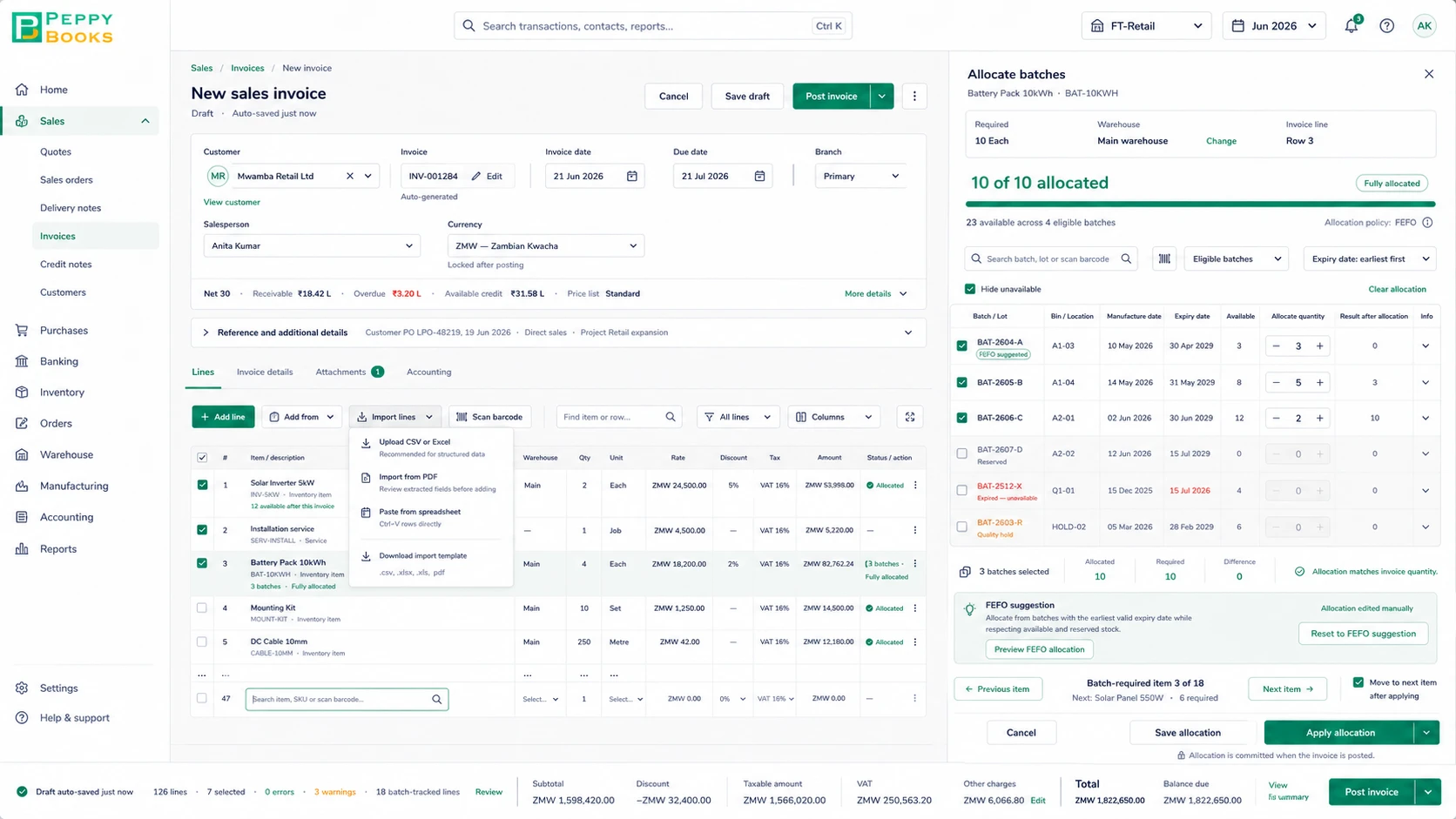
PeppyBooks new sales invoice — line items with VAT, and a batch/lot allocation panel using nearest expiry first by expiry date.
erp.peppybooks.com/sales/invoices
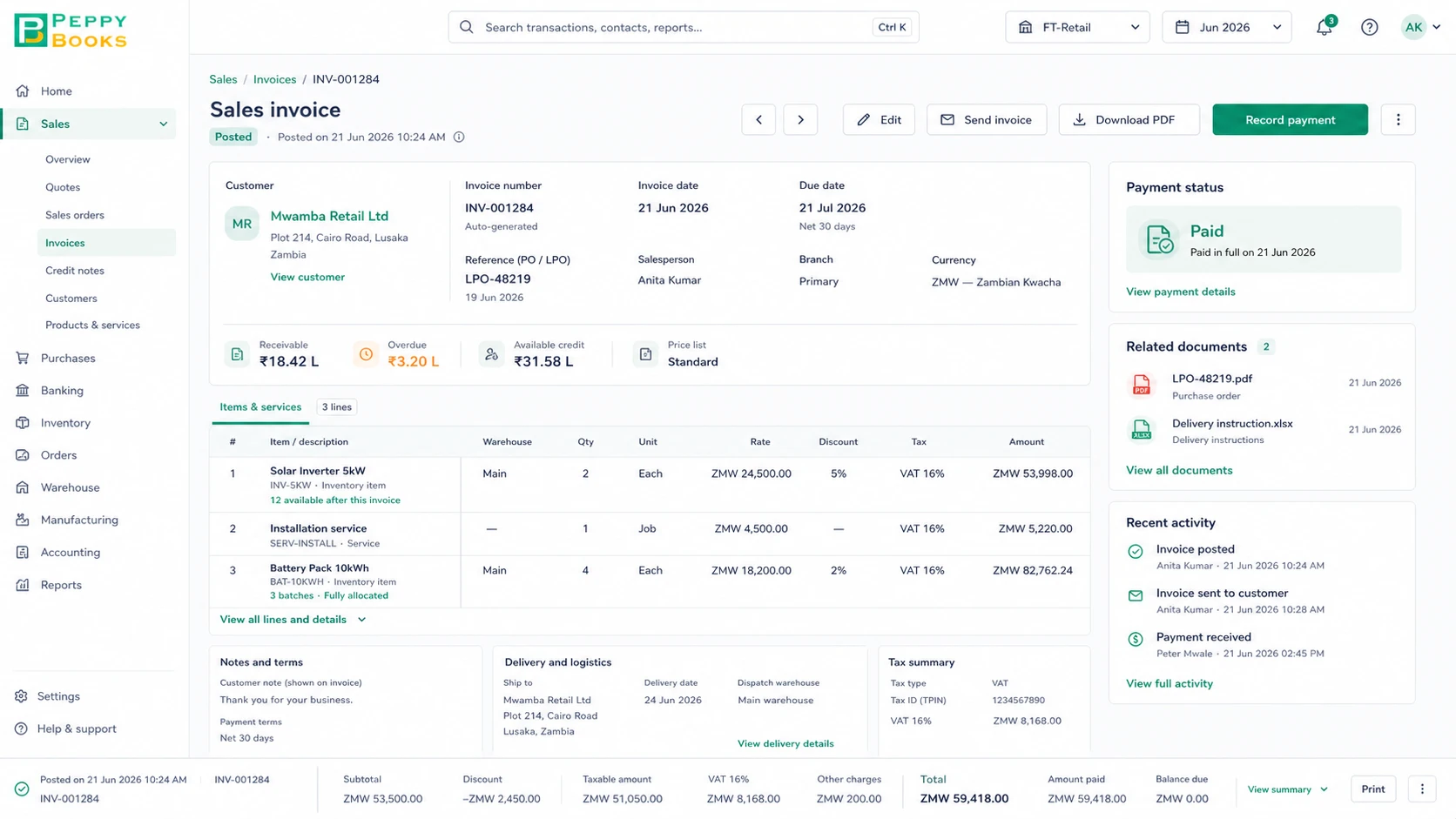
PeppyBooks posted sales invoice — paid in full, with tax summary, related documents and a full activity trail.
Compare

PeppyBooks compared with how most businesses bill today

An honest look. Each of these is good at what it was built for.

PeppyBooks billing compared with the options most businesses weigh up
What mattersPeppyBooksTallyZoho BooksQuickBooksWord / Excel
Make an invoice quicklyYesYes — a genuine strengthYes — a genuine strengthYes — a genuine strengthYes, but typed by hand
Accounts update from the invoiceYes — the invoice is the entryYes — accounting is its coreYes — accounting is its coreYes — accounting is its coreNo — entered again separately
Stock goes down as you invoiceYesYes — stock is includedDepends on plan; may require Zoho InventoryDepends on planNo
Payment link on the invoiceYesDepends on your setupYesYesNo
Chases overdue money for youYes, automaticallyDepends on your setupYesYesNo — you chase
Send on WhatsAppYesDepends on your setupDepends on plan and countryMay require another applicationNo
Country e-invoicing (India, Kenya, Zambia, Ghana, UAE & more)9 countries built inStrong in India (GST & e-invoicing)Depends on the country editionNot available in India since 2023No
Customers, purchases, staff pay in the same placeIncluded by planStock included; CRM and payroll may require another applicationMay require other Zoho applicationsMay require another applicationNo
How it's pricedFrom $17 per user per monthMainly a one-time licence, plus yearly supportMonthly subscription, by planMonthly subscription, by planFree, but paid for in your time

Where each is strong: Tally is a genuine strength if you want your books on your own computer and your accountant already knows it. Zoho Books and QuickBooks are strong cloud accounting products, particularly for service businesses. Excel is unbeatable for a one-off. PeppyBooks is best suited for businesses that want the invoice, the stock and the accounts to be one thing. Compiled from each vendor's published information — last verified 17 July 2026. Features and pricing change and vary by country and plan; please check the vendor's current terms before deciding.

Switching

Moving from what you use now

You do not have to stop billing to change. Most businesses run both for a few days and then stop the old one.

  1. 1
    Keep billing as you are

    Nothing switches off. Set PeppyBooks up alongside what you use today.

  2. 2
    Send us your lists

    Customers, items and rates in a spreadsheet — we load them for you.

  3. 3
    Bill a few real invoices

    Send them to real customers and check the numbers against your own.

  4. 4
    Stop the old way

    Only when you are happy. Guided migration is free on annual plans.

“What about my old invoices?”

Your customers, items and outstanding invoices come across, so you know who owes you from day one. Old paid invoices can stay where they are for your records.

“Will my numbers still match?”

We check your opening balances against your existing trial balance before you go live. If they don't match, you don't go live.

“Can my accountant still work?”

Yes — give them their own login. Most accountants prefer it: they review and file instead of re-typing your bill book.

“What if I don't like it?”

The trial is 14 days and takes no card. Your data stays yours and you can export it at any time.

The complete guide

Software to make your invoices: what you need to know

Last updated 3 July 2026 · Reviewed by the PeppyBooks product & compliance team

What does billing software do?

Billing software automates the document chain that turns work into cash: quotes, sales orders, invoices, receipts and credit notes. Good systems add payment links so customers can pay the moment they open an invoice, automatic reminders for overdue accounts, and recurring schedules for repeat billing. In regulated markets, billing software also handles e-invoicing compliance — registering documents with tax authorities in real time.

How to get paid faster

  • Invoice immediately — every day between delivery and invoice is a free loan to your customer
  • Put a payment link on every invoice; removing friction reliably speeds payment
  • Automate reminders at 3, 7 and 14 days overdue — polite persistence works
  • Watch an ageing report weekly and act on the 30+ bucket
  • Let payments close off invoices by themselves, so you chase real debts, not ones already paid
1platform for books, stock & CRM
2 clicksfrom report to source document
14 daysfree on every plan
FAQ

Common questions

Can customers pay online from the invoice?

Yes — invoices carry payment links for cards, bank transfers and popular wallets, and the payment closes off the invoice by itself.

Does it support recurring billing?

Yes — schedules, proration and automatic reminders are built in, with revenue reporting by plan.

Is e-invoicing really included?

Yes. Sending invoices to your country's tax system (eTIMS, ZRA, ZATCA, e-VAT, GST and more) is part of the product, not a paid extra.

What is the difference between billing and accounting software?

Billing software makes the bill for your customer. Accounting software keeps the record of what your business earned, owes and is owed. PeppyBooks is both — the bill you make is already the accounting record, so nothing is typed twice.

Start for free — 14 days, no card