🎉 Free 14-day trial on every plan — no credit card, no sales call, cancel anytime. Start now →
📊 Reporting & BI

Know what your business actually made

Your profit, your cash, who owes you and what your stock is worth — on screen, today, without waiting for anyone to prepare it. From $17 per user per month.

  • No credit card required
  • Set up in under 10 minutes
  • Cancel anytime, keep your data
P&L · Drill-down
Revenue · June$182,400
↳ Nairobi branch$96,100
↳ Mombasa branch$86,300
↳ INV-2201 · Acme Retail$12,900
Books → branch → invoice in two clicks
Start here

What are business reports, in plain words?

A report answers a question you already ask out loud: Did we make money this month? Who owes me? Can I pay the supplier on Friday? Which product is actually earning?

In most businesses those answers arrive weeks late, because someone has to collect the bills, type them up and prepare a statement. In PeppyBooks the answers are already there — every bill, payment and stock movement went in as it happened, so the report is just a view of what you already did. And you can click any number to see the exact bill behind it.

How it helps you

How it helps your kind of business

Same numbers, different question depending on what you run.

Shop owners

Today: You know the day's takings but not the day's profit.

With PeppyBooks: Sales minus real cost, per item and per shop, before you lock up.

Traders

Today: Turnover looks healthy but the bank balance does not.

With PeppyBooks: Profit per deal after freight and duty — so you see which deals actually earned.

Manufacturers

Today: Nobody can say what a unit really costs to make.

With PeppyBooks: Material, labour and overhead per unit, and the margin that follows.

Distributors

Today: You know sales per route, not profit per route.

With PeppyBooks: Margin by route, rep and outlet — so you can see which routes are worth running.

Finance managers

Today: Month-end is spent building the statement, not reading it.

With PeppyBooks: The statements are already there; your time goes on what they say.

Multi-branch owners

Today: Each branch reports its own way, and merging takes a week.

With PeppyBooks: Every branch on one screen — separately, or added together.

How it works

Up and running in three calm steps

1

It's already connected

Reports read the same database the business runs on.

2

Pick your views

Dashboards per role; comparisons per branch and company.

3

Let them deliver themselves

Scheduled emails put the right numbers in the right inboxes.

01

Financial statements that are always current

P&L, balance sheet, cash flow and ratio analysis, generated live from your books — never from last week's export.

Live P&L, balance sheet and cash flow

Ratio and trend analysis

Comparatives by period, branch and company

Drill-down from any line to source documents
02

Operational analytics in the same place

Sales by product, customer, region and rep; stock ageing and movement; receivables and payables health — one login for finance and operations.

Sales analytics by any dimension

Fast/slow movers and dead stock

Receivables/payables ageing

Van, route and outlet performance

03

Reports that deliver themselves

Schedule any report to email daily, weekly or monthly, with role-based dashboards so each manager wakes up to their own numbers.

Scheduled email reports

Role-based dashboards

Export to Excel and PDF when you need it

Consolidated multi-company reporting

Inside the product

What you'll actually see

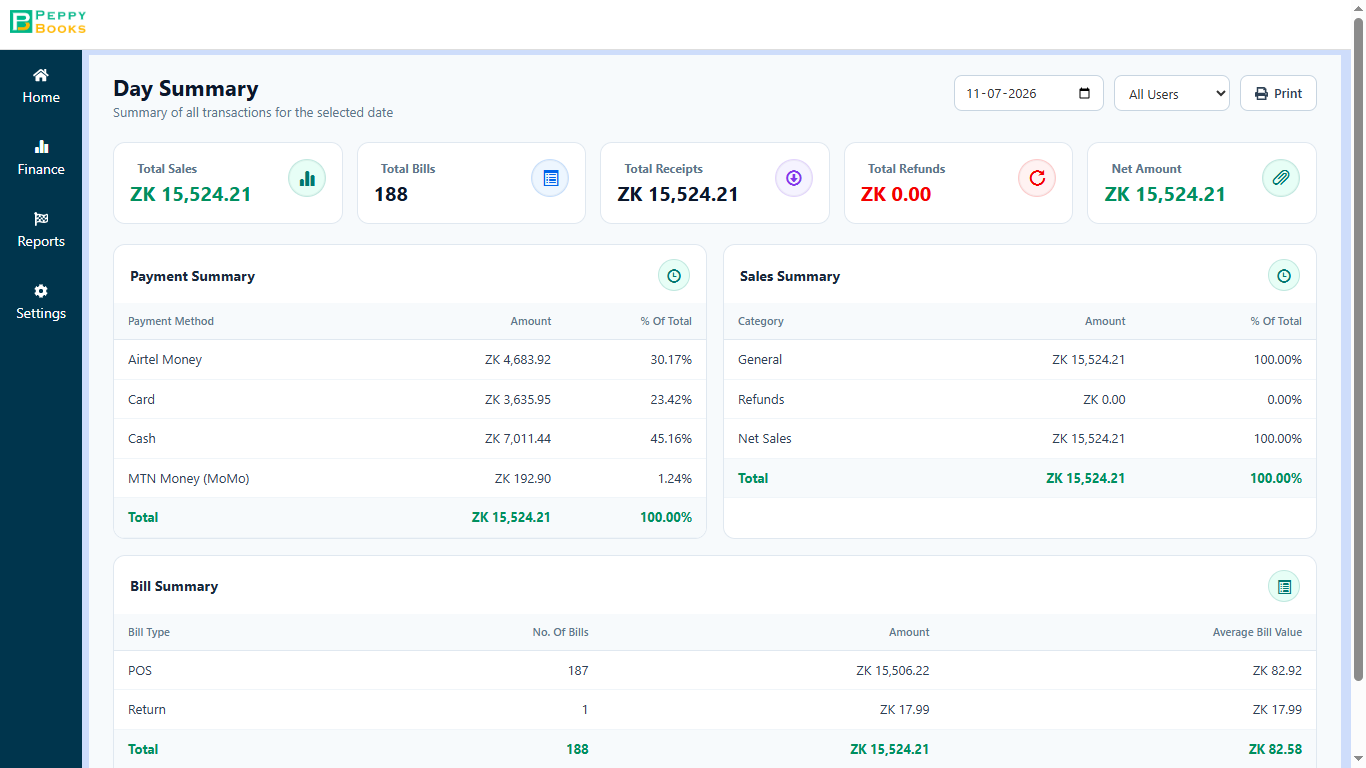
erp.peppybooks.com/pos/day-summary
PeppyBooks POS Day Summary — total sales, bill count and receipts, broken down by payment method and bill type.

This is what you check before you lock up. The day's total sales, how many bills, and how much came in by cash, card and mobile money — so the money in the drawer can be checked against the screen in a minute.

Notice This is the screen that replaces adding up the day by hand. It is ready the moment the last customer leaves.

Compare

PeppyBooks compared with how most businesses get their numbers

An honest look at the usual options.

PeppyBooks reporting compared with the options most businesses weigh up
What mattersPeppyBooksTallyZoho BooksExcel from your accountant
Profit & loss, balance sheet, cashYes, liveYes — a genuine strengthYesYes, when it is prepared
How fresh the numbers areAs at this minuteAs at your last entryAs at your last entryUsually last month
Click a number to see the bill behind itYesYes — a genuine strengthYesNo
Stock value that agrees with your booksYes — one recordYes — stock is includedDepends on plan; may require Zoho InventoryOnly if someone checks it by hand
Profit per product, shop, route or projectYesDepends on how you set up cost centresDepends on planOnly if someone builds it
Reach it from your phoneYesBest suited for a computer in the office; remote access is availableYesWhenever it is emailed to you
Who can see itYou choose, per personDepends on your setupYou choose, per personWhoever has the file
How it's pricedFrom $17 per user per monthMainly a one-time licence, plus yearly supportMonthly subscription, by planYour accountant's fee

Where each is strong: Tally's reporting is a genuine strength and accountants know it deeply. Zoho Books reports well on the cloud. Your accountant's spreadsheet is exactly right for statutory filing. PeppyBooks is best suited when you want the answer today rather than after someone prepares it. Compiled from each vendor's published information — last verified 17 July 2026. Features and pricing change and vary by country and plan; please check the vendor's current terms before deciding.

The complete guide

Know what your business actually made: what you need to know

Last updated 3 July 2026 · Reviewed by the PeppyBooks product & compliance team

What is financial reporting & BI software?

Financial reporting software turns books data into statements and decisions: P&L, balance sheet, cash flow, ratios and management dashboards. The distinguishing feature of good reporting is drill-down — clicking a number to see the transactions behind it — and freshness: reports generated from live books rather than last week's export.

Reports every product business should watch

  • Weekly: cash position, receivables ageing (30+ bucket), fast/slow movers
  • Monthly: P&L vs budget by branch, gross margin by product line, stock ageing
  • Quarterly: customer concentration, dead stock write-off candidates, ratio trends
  • Always-on: exception alerts — negative margins, credit limit breaches, reorder points
1platform for books, stock & CRM
2 clicksfrom report to source document
14 daysfree on every plan
FAQ

Common questions

Can I drill into report numbers?

Yes — click any line in a financial statement to see the transactions behind it, down to the individual invoice.

Can reports be emailed automatically?

Yes — schedule any report daily, weekly or monthly to any set of recipients.

Does it consolidate multiple companies?

Yes — consolidated or side-by-side reporting across companies and branches is built in.

What does drill-down reporting mean?

Clicking any report number to see the transactions behind it — from P&L line to branch to the individual invoice — without exporting or asking the accounts team.

Start for free — 14 days, no card