Software to manage your stock
Know what you have, where it is, and what it really cost you — across every shop and godown. Every movement updates your accounts by itself, so your stock and your books never disagree. From $17 per user per month.
- Every location, and your real cost after freight
- Batch, serial & expiry
- Posts to accounting automatically
What is stock management software?
Stock management software answers three questions you ask every day: what do I have, where is it, and what did it really cost me? It keeps count of your goods as they come in, move around and go out — so you are not walking the godown to find out.
Most businesses keep a stock register that is updated when someone remembers, and books that are updated separately. So the register, the shelf and the accounts are three different answers. In PeppyBooks there is one count. A sale takes the item off the shelf and puts the cost in your books at the same moment — and because it counts freight and duty into what the goods actually cost you, the profit it shows is the real one.
What changes, business by business
The same stock count, solving a different problem depending on what you sell.
Retailers
Today: A customer asks for something the register says you have, and you do not.
With PeppyBooks: Stock goes down as you sell, so what you see is what is actually on the shelf.
Traders & wholesalers
Today: You sell the same consignment twice because nobody knows what is promised.
With PeppyBooks: On hand, on order and in transit are three separate numbers on one screen.
Manufacturers
Today: Production stops because material ran out, and nobody saw it coming.
With PeppyBooks: The order tells you what material you are short of before the line stops.
Pharmacies
Today: Expiry is found at the counter, and the supplier's return window has passed.
With PeppyBooks: Batch and expiry tracked, oldest billed first, near-expiry claimed in time.
Garment sellers
Today: Stock is counted by style, so the size curve is invisible.
With PeppyBooks: Every size and colour tracked separately — reorder what is actually moving.
Multi-location owners
Today: Each godown keeps its own count and moving stock creates arguments.
With PeppyBooks: One screen for every location, and transfers that update both sides.
One master record for every product you sell.
Variants, attributes, barcodes, units of measure, HSN/tax and images — defined once and shared across POS, orders, purchasing and accounting. No duplicate item lists to keep in sync, ever.
- Variants & attributes (size, colour, grade)
- Multiple units of measure & barcodes per item
- HSN/SAC, tax, reorder level and pricing in one place
Every location's stock, on one screen.
In stock, held for orders, on the way and free to sell — for every item, in every shop and godown, with low, minus and dead stock flagged the moment they appear.
Head Office
Branch 1
Branch 2
Central WH
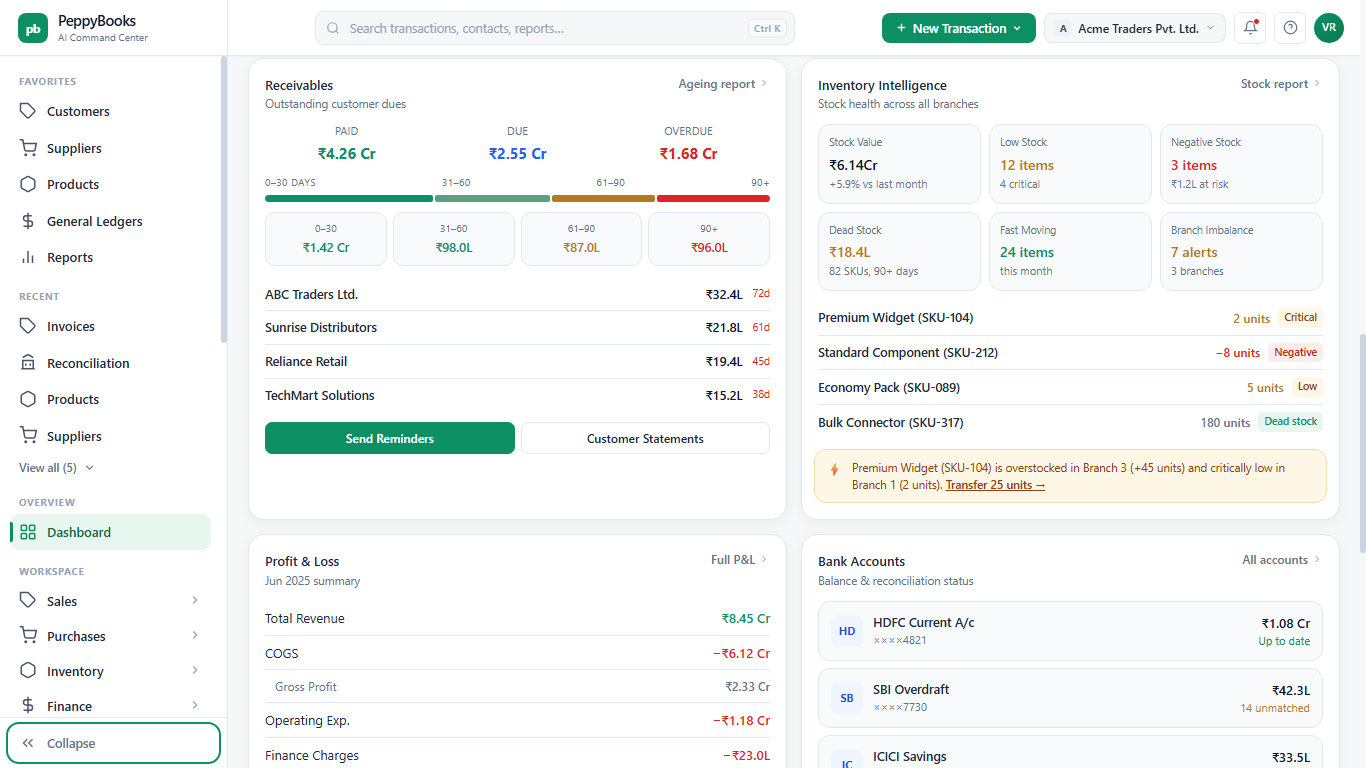
Move stock between locations — books stay balanced on both sides.
Raise a transfer, dispatch and receive; in-transit stock is tracked the whole way, and both locations' valuation posts automatically. Rebalance overstock into stockouts before you lose a sale. Try it 👉
- In-transit tracking with dispatch & receipt
- Both sides post automatically — no double entry
- Branch-imbalance suggestions from the command center
Cost your stock at what it truly cost to land.
Spread freight, duty, insurance and clearing across a shipment by value, weight or quantity — so your cost is what the goods really cost you, not just the supplier's price on the invoice.
- Apportion charges by value, weight or quantity
- Real cost per unit drives your stock value & profit
- Multi-currency shipments handled automatically
Reorder at the right time, in the right quantity.
Set reorder points and safety stock per item per location, or let PeppyBooks compute them from demand and lead time — then turn suggestions into purchase orders in a click. Drag the sliders 👉
- Reorder points per item, per location
- AI suggestions from demand & supplier lead time
- One-click purchase orders from suggestions
Track every batch, serial, expiry and warranty.
Record batches and serial numbers as goods arrive, sell the nearest expiry first, and trace any unit from supplier to customer — essential for pharmacy, food, electronics and regulated goods.
| Batch / Lot | Qty | Mfg date | Expiry | Status |
|---|---|---|---|---|
| BW-2405 | 320 | 12 May 2025 | 12 May 2027 | 720 days |
| BW-2312 | 145 | 08 Dec 2024 | 08 Aug 2025 | 28 days |
| BW-2308 | 40 | 15 Aug 2024 | 15 Jun 2025 | Expired |
| SN-serialised | 18 | — | Warranty 24 mo | Tracked |
Value inventory your way — and see the difference.
Choose FIFO, weighted average or standard costing per company. Valuation flows straight to the balance sheet and Cost of sales — and you can compare methods before you commit.
FIFO
Gross margin 27.6%
Weighted average
Gross margin 26.6%
Standard cost
Variance tracked
Negative stock, caught the moment it happens.
Sell more than you have and PeppyBooks flags it instantly — instead of silently corrupting your margins and valuation. Block it, warn, or allow it with a reason: your policy, enforced per location.
- Real-time negative-stock detection
- Per-location policy: block, warn or allow-with-reason
- Protects Cost of sales and valuation from silent errors
Count with confidence. Adjust with a trail.
Run full or cycle counts on any device, scan to count, and post variances as adjustments — every one reason-coded and logged, with valuation updated automatically. Every movement is traceable, end to end.
- Full & cycle counts with barcode scanning
- Reason-coded adjustments, fully audited
- Complete movement history per item & location
From dock to dispatch, documented.
Receive against POs with goods receipt notes (full or partial), and dispatch against orders with delivery notes and picking lists — stock and accounting move exactly when the goods do.
Every channel draws from one live stock.
POS counters, your webstore, marketplaces and CRM sales orders all reserve and deplete the same inventory in real time — so overselling stops and every channel sees the truth.
Purchase to stock, without re-entry.
A purchase order moves through goods-in, checking and shelving into live stock — and what you owe the supplier is recorded at the same moment, at the real cost.
- Purchase orderApproved & sent
- Goods receiptFull or partial
- Quality checkAccept / reject
- Put-awayStock ↑ at its real cost
- Payable postedBooks in step
Every sale knows its true margin.
When stock ships, the cost of what you sold is recorded at what the goods really cost you — so you see the profit on each product as it happens, not three months later.
- Stock shipsAt its real cost
- Cost of sales recordedReal cost, not average guess
- Margin livePer product, per branch
| Product | Units sold | Revenue | Cost of sales | Margin |
|---|---|---|---|---|
| Premium Widget SKU-104 | 1,240 | ₹30.4L | ₹23.3L | 23.4% |
| Standard Component item-212 | 3,180 | ₹19.1L | ₹15.6L | 18.3% |
| Economy Pack SKU-089 | 2,050 | ₹8.2L | ₹7.4L | 9.8% ↓ |
| Bulk Connector item-317 | 640 | ₹12.8L | ₹9.1L | 28.9% |
The reports operations actually run on.
Open any number to see what is behind it, export it, or have it emailed to you — from a one-line stock summary to item-by-item ageing and movement.
Load thousands of items in minutes.
Bulk-import products, opening stock and costs from CSV or your old system, with a mapping step and validation — or bring full history from Tally, Unicommerce and more.
PeppyBooks compared with how stock is usually tracked
An honest look. Each of these is good at what it was built for.
| What matters | PeppyBooks | Tally | Zoho Inventory | A stock register / Excel |
|---|---|---|---|---|
| Know what you have, right now | Yes, live | Yes — stock is included | Yes — a genuine strength | As at the last time someone wrote it down |
| Stock across several locations | Yes, on every plan | Depends on how your companies are set up | Yes | A register each |
| What the goods really cost you (freight, duty) | Counted in automatically | Depends on your setup | Yes | Worked out in Excel, later |
| Told before an item runs out | Yes | Depends on your setup | Yes | Only if someone checks |
| Batch, expiry and serial numbers | Yes | Yes | Yes | Written by hand |
| Stock value that agrees with your books | Yes — one record | Yes — accounting is its core | Best suited when used with Zoho Books | Only if someone checks it by hand |
| Billing, customers and staff pay too | Included by plan | CRM and payroll may require another application | May require other Zoho applications | No |
| Reach it from anywhere, on a phone | Yes — built for the web | Best suited for a computer in the office; remote access is available | Yes | No |
| How it is priced | From $17 per user per month | Mainly a one-time licence, plus yearly support | Monthly subscription, by plan | Free, until stock goes missing |
Where each is strong: Tally is a genuine strength if your books already live there and your accountant knows it. Zoho Inventory is a strong dedicated stock and order product, especially alongside Zoho Books. A register works until you have more stock than one person can hold in their head. PeppyBooks is best suited when your stock count and your books should be the same record. Compiled from each vendor's published information — last verified 17 July 2026. Features and pricing change and vary by country and plan; please check the vendor's current terms before deciding.
Moving from your stock register
You do not have to stop trading to change. Start with one location and one count.
- 1Keep trading as you are
Nothing switches off. Set PeppyBooks up alongside your register.
- 2Send us your item list
Item names, rates, tax and barcodes in a spreadsheet — we load them for you.
- 3Count once, properly
Do one physical count and enter it as your opening stock. This is the honest starting line.
- 4Move location by location
Start with one godown or shop. Add the rest once the first one is right.
“Do I have to count everything first?”
Yes, once — and it is worth it. An opening count is the only way the numbers mean anything. After that, PeppyBooks keeps the count for you.
“What about my old stock records?”
Your item list and opening stock come across. Old registers stay where they are for your reference — you do not need them to start.
“Do I need barcodes?”
No. Barcodes make it faster, but you can search by name. If you do want them, it works with most scanners and printers you already own.
“What if my count is wrong?”
Adjust it — every adjustment keeps a record of who did it and why, so nothing disappears quietly.
Straight answers for operations teams.
Does inventory post to accounting automatically?
Yes. Every goods-in, issue, transfer and adjustment records your stock value and cost of sales into your books at the real cost, so the stock value in your accounts always matches what is actually in the godown.
Can I manage stock across multiple warehouses and branches?
Yes. See on-hand, reserved, in-transit and available for every item across all locations, and move stock between them with transfers that post both sides automatically.
Does it track batches, serial numbers, expiry and warranty?
Yes. Record batches and serial numbers as goods arrive, sell the nearest expiry first, and trace any unit from supplier to customer — with warranty tracking on serial-numbered goods.
How does reorder management work?
Set reorder points and safety stock per item per location, or let PeppyBooks compute them from average demand and supplier lead time, then convert suggestions into purchase orders in a click.
Can it prevent or flag negative stock?
Yes. Negative stock is flagged the moment it occurs, and you can block it, warn, or allow it with a reason — your policy, enforced per location.
Can I bulk-import my products and opening stock?
Yes. Import products, opening stock and costs from CSV or your old system with a mapping-and-validation step, and bring history from Tally, Unicommerce and more.
Take command of your stock.
See every item, in every location, at its true cost — with the books always in step. Free for 14 days, every feature unlocked. No card, no sales call.