🎉 Free 14-day trial on every plan — no credit card, no sales call, cancel anytime. Start now →
🏬 Retail outlet management

Run every retail outlet from one dashboard

One catalogue, one price list, one books — every store billing fast at the counter while head office watches sales, stock and margins per outlet in real time. Built for chains of two stores or two hundred.

  • No credit card required
  • Set up in under 10 minutes
  • Cancel anytime, keep your data
Outlets · Live
MG Road store₹84,200 today
Indiranagar store₹61,900 today
Stock transfer #ST-88In transit
Dead stock alert4 items
Every till posting to one books
How it works

Up and running in three calm steps

1

Set up your outlets

Catalogue, prices and taxes are defined centrally — stores inherit them instantly.

2

Sell at every counter

Barcode-fast POS with offline mode and live stock at each store.

3

Watch it all in one place

Sales, margins and stock per outlet, consolidated books for the business.

01

One catalogue, every store

Price changes, new products and promotions go live across all outlets the moment head office saves them — no calling stores with updates.

Central product catalogue and price lists

Store-specific pricing where you need it

Promotions and schemes controlled centrally

Tax settings applied consistently everywhere

02

POS built for queues, not demos

Each counter bills at barcode speed with held bills, split payments and offline mode — receipts stay tax-compliant for your country.

Barcode scanning and quick keys

Offline billing that syncs on reconnect

GST/VAT-compliant, send to the tax departmentd receipts

Shift cash-up per counter, per store

03

Stock that moves between stores intelligently

See every outlet's stock live, move inventory where it sells, and stop dead stock from hiding in a back room.

Live stock by outlet and warehouse

Inter-store transfers with in-transit tracking

Reorder alerts per location

Fast/slow mover analysis by store

04

Outlet P&L and accountability

Compare stores on the numbers that matter, spot problems early, and keep staff access matched to their role.

Per-outlet P&L with cost allocation

Store benchmarking and targets

Role-based access per store and function

Consolidated accounts for the whole business

Inside the product

What you'll actually see

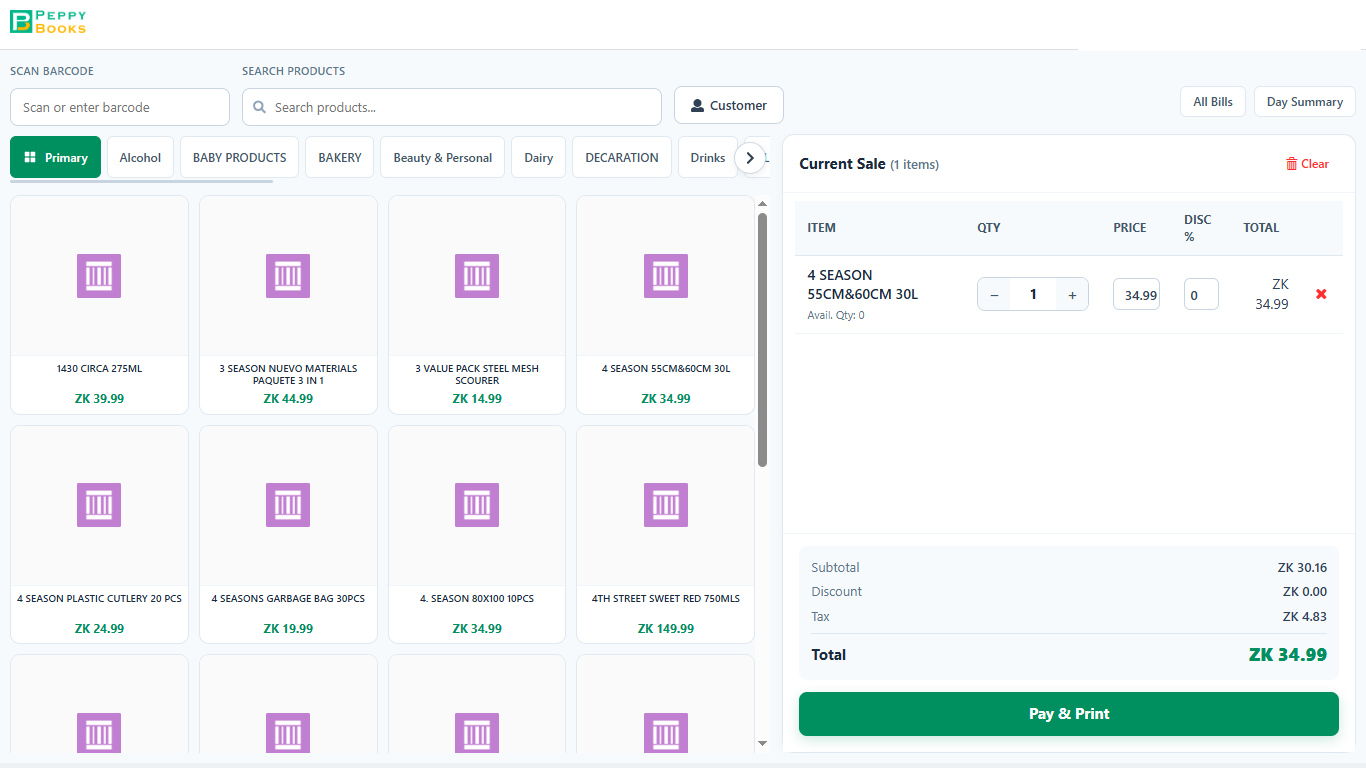
erp.peppybooks.com/pos
PeppyBooks POS terminal — barcode scan and product search, category tabs, and a live cart with subtotal, discount, VAT and Pay & Print.

This is the counter screen your staff use all day. They scan an item or tap it from the tiles — the price and tax come in by themselves. The right side adds up as they go, so the customer is told the correct total. One button takes the money and prints the receipt.

Notice Look at the right-hand column: discount and VAT are worked out as each item goes in. Nobody is doing this on a calculator.

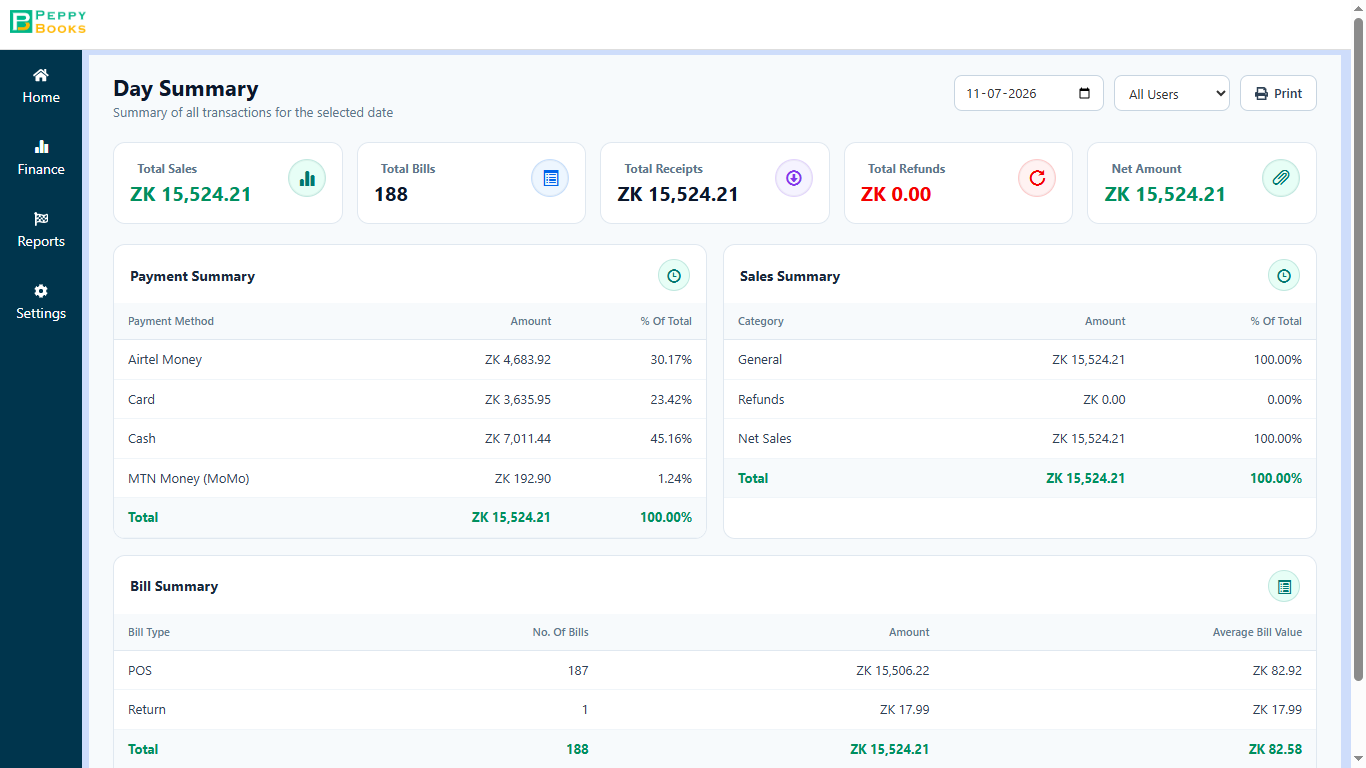
erp.peppybooks.com/pos/day-summary
PeppyBooks POS Day Summary — total sales, bill count and receipts, broken down by payment method and bill type.

This is what you check before you lock up. The day's total sales, how many bills, and how much came in by cash, card and mobile money — so the money in the drawer can be checked against the screen in a minute.

Notice This is the screen that replaces adding up the day by hand. It is ready the moment the last customer leaves.

The complete guide

Run every retail outlet from one dashboard: what you need to know

Last updated 3 July 2026 · Reviewed by the PeppyBooks product & compliance team

What is retail outlet management software?

Retail outlet management software runs multi-store retail from one system: a central product catalogue and price list, POS billing at each counter, per-store stock with transfers, and consolidated reporting so head office sees every outlet's sales and margins live. It replaces the patchwork of standalone tills, spreadsheets and phone calls that multi-store retailers otherwise grow into.

Single store vs multi-outlet: what changes

The mistake most growing retailers make is duplicating their single-store setup per location — five tills, five spreadsheets, five versions of the truth. Outlet management software centralises control while each store keeps billing at full speed.

What changes when you go multi-outlet
ConcernSingle storeMulti-outlet needs
PricingSet at the tillCentral price lists, store overrides
StockOne stockroomPer-store stock + transfers + reorder by location
StaffOwner watches the counterRole-based access, shift cash-up per counter
ReportingDaily takingsOutlet P&L, store benchmarking, consolidated books
ComplianceOne registrationConsistent tax treatment at every till

How to choose retail outlet software

  • Offline-capable POS — an internet cut must not close a store
  • Central catalogue with instant price propagation
  • Live inter-store stock visibility and transfers
  • Per-outlet P&L, not just consolidated totals
  • Tax-compliant receipts for your country out of the box
  • Accounting behind it all — takings that post to a books, not a spreadsheet
1platform for books, stock & CRM
2 clicksfrom report to source document
14 daysfree on every plan
FAQ

Common questions

How many outlets can it handle?

The platform runs networks from two stores to large chains — each outlet gets its own live view while head office sees everything consolidated.

Does each store need its own subscription?

No — outlets run under one PeppyBooks account with per-user pricing and role-based access per store.

What happens when a store loses internet?

Billing continues offline at the counter and syncs — including compliance submission — when the connection returns.

Can I see which store is most profitable?

Yes — per-outlet P&L with cost allocation shows each store's real contribution, side by side.

Does it work for franchised outlets too?

Yes — pair it with PeppyBooks franchise management for royalty billing, compliance tracking and franchisee onboarding.

Start for free — 14 days, no card